Retro Christmas Tree Graphics for Digital Illustrations
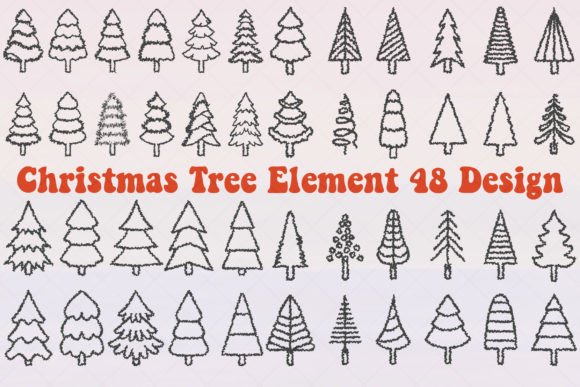
Opening the files for the Retro Christmas Tree Element 48 Design, my first impression was a strong sense of festive, vintage charm. This isn't a generic clipart set. The style feels decorative and playful, with a clear nod to classic holiday illustrations. The mood leans toward a cozy, nostalgic Christmas—perfect for attracting audiences looking for something warmer and more unique than sleek, modern designs. I immediately thought of crafters, makers who sell handmade goods, and small business owners aiming for a rustic or vintage brand identity.
The Core Offering for Commercial Use
This graphic design asset provides a solid foundation for commercial product creation. You receive 48 individual SVG files, giving you incredible flexibility. There is also a single black and white EPS file, a color EPS file containing all the designs, and 48 PNG files with transparent backgrounds. This format mix is exactly what a digital seller needs. The SVGs are ready for scaling in Cricut projects or print-on-demand merchandise, while the PNGs are instantly usable for digital products like Canva templates or social media graphics.
Testing Across Real Selling Scenarios
Before listing any product using these assets, I test them in realistic contexts. For a holiday-themed Etsy shop or a seasonal collection on a creative marketplace, here's how I would vet the Retro Christmas Tree Element 48 Design.
First, I'd create a series of product mockups. I'd apply a few of the trees to a t-shirt graphic mockup and a mug design to gauge visual appeal. Does the retro style look cohesive on the product? Next, I'd place them into a printable wall art template at a standard 8x10 size and check the resolution—the PNGs need to hold quality when printed. For digital download items like a planner sticker sheet, I'd import the SVG into design software to ensure the cutting lines are clean and separate properly, a critical step for Cricut users.
Thumbnail appeal is everything online. I'd create a simple listing image featuring one of the more complex tree illustrations alongside text. The goal is to see if the design stands out in a small marketplace thumbnail. I'd test it on both a white and a dark background to check for contrast issues. This set, with its detailed lines, might get lost on a busy, dark background, so a clean white or light pastel backdrop would likely perform better.
Where This Asset Excels in Product Creation
The sheer number of variations—48 unique trees—makes this asset powerful for building themed bundles and collections. You can create a cohesive holiday look across your entire product line.
It shines in decorative layouts for printable products like greeting cards, invitation templates, and digital paper packs. The individual elements allow for creative stacking and arrangement. For merchandise, the bold outlines of the SVG designs make them excellent candidates for sublimation designs on tumblers or tote bag prints. The retro vibe lends itself well to nursery prints or scrapbooking kits targeting a handmade aesthetic.
For digital product sellers, these illustrations can be the core of a successful Canva template. You could build a suite of social media templates or blog graphics for the holiday season, offering clients a consistent visual story. Using them in product presentation, like mockup previews for your own listings, increases perceived value and customer trust. A well-curated bundle featuring multiple tree designs looks more professional and valuable than a single graphic.
Potential Pitfalls and Practical Checks
While versatile, there are areas where this asset requires careful application. The intricate details on some trees might not translate well to tiny sticker details; simpler designs from the set would be better for small-scale products. Similarly, using them in overly complex layouts with other elements could create crowded thumbnails, reducing click-through potential.
For physical products, always test print colors if you're offering finished goods. The color EPS provides a guide, but colors can shift in printing. Crucially, verify the PNG transparency in your software—a faulty transparency can ruin a digital download product. For SVG-based projects like Cricut stickers, inspect the cut quality by running a test cut on a simple material; overlapping lines can cause cutting issues.
Integrating into a Professional Product Collection
To elevate this from a standalone asset to part of a professional online shop, organization is key. When selling the finished digital product or template, organize the 48 files clearly for your customers—group by style or complexity. Pair the illustrations with complementary fonts. The retro style pairs beautifully with a classic serif font for elegant products like invitations, or a playful script font for more casual items like t-shirt graphics. A clean sans-serif can modernize it for social media templates.
Finally, confirm the commercial licensing of your source asset before selling any derivative products. Using the Retro Christmas Tree Element 48 Design, you can build a wide range of sellable items: clipart bundles for other creators, sublimation design packs, printable holiday décor collections, or branded merchandise for a small business. By testing it across mockups, checking technical details, and thoughtfully integrating it into your branding, this set becomes a valuable investment for your seasonal digital product creation.